Tools for Studying Chinese with Emacs
Useful Emacs packages
📅Tags: #chinese #emacs
In my 20 years of studying Chinese, I have tried countless tools for helping me learn efficiently.
Recently, I have seen a growing overlap between Chinese learners and Emacs users. Therefore I want to share some of the tools that I have found or developed since switching to our beloved editor.
On AI/LLMs
It’s probably quite shocking to find no AI packages on this list. While I don’t fundamentally have any issue with people using AI for language learning, I find that many people now automatically reach to LLMs as their first port of call.
LLMs need to be considered a tool, and for my particular use case there are better tools for the job.
Paw
Paw by Damon Chan is one of the most impressive packages I have seen. I think that for language learners and knowledge workers, it has the potential to be considered in the same vein as Org-Mode and Magit as a killer Emacs package.
Paw manages to combine many Emacs packages and command line applications into a cohesive environment. It can manage known words and annotations, it can access online and offline dictionaries and it can be used as a front-end to LLMs for your language learning needs.

The author primarily developed it to work with English and Japanese, but I have worked on adding basic Chinese support. There is still work to be done, as the package is being actively developed. There are some new features such as live annotation that I haven’t even tried yet.
jieba
Any Chinese learner should use a tool that segments text into words, rather than just breaking it down character by character. There are emt for Mac, ewt-rs for Windows, emacs-chinese-word-segmentation, but I settled on the cross platform emacs-jieba as the rust implementation of jieba is both fast and actively developed.
CC-CEDICT
CC-CEDICT is a Creative Commons licensed Chinese to English dictionary that is built into many popular Chinese dictionary applications such as Pleco. I have added a few words over the years, but it’s definitely something that I want to contribute more to in the future.
It is really useful having a dictionary that is so thorough and has such consistent formatting in a plain text format. In fact I use the Emacs package cc-cedict.el as the base for many of my own functions in which I need the pinyin or definition of a given word.
pinyin-convert
I have been using pinyin-convert to convert between pinyin written with tone numbers and diacritics. I mostly use it in conjunction with cc-cedict.el as that dictionary uses tone numbers like zhong1guo2. Running pinyin-convert--string-to-tone-mark will convert it to zhōngguó. This is a small package but it works really well. It’s definitely worth trying out.
Typing Chinese
Before I switched to Emacs, I was using fcitx5 and rime for typing in Chinese, so naturally emacs-rime was a logical choice as my input method editor. It works really well and I like how it allows regular keys to be used in normal mode for both evil and meow. Nowadays, this is the only way that I type Chinese on my computer. If I want to type in another application, I do it via an pop-up Emacs buffer.
For systems where librime is not available, pyim is another alternative. I have never needed any alternative to emacs-rime so haven’t tried it out. The user TomoeMami reached out to me to suggest sis for using OS-native input sources and Emacs-native input sources.
zh-utils
I wrote the zh-utils package to collect all the Chinese related functionality I have written over the years. It is easier for me to manage now that I am treating it as a package instead of various functions in my init.el, and other learners can take advantage of it.
As of now it is capable of the following:
- Convert Chinese characters to Pinyin
- Check if a string is Chinese or not
- Return the most likely Chinese word at point using segmentation
- Return which part of speech a given string belongs to
Check out the readme for more details.
Tone Colours
Pleco is definitely the best Chinese dictionary on mobile, and one feature that I didn’t realise was so useful when I started using it all those years ago is having characters coloured based on the tone associated with it.
I found that when I think of a character, I quite often would picture it in red, green, blue, purple or grey depending on its tone. My zh-utils package includes some code that utilises org-mode links to achieve the desired result.
For example [[t3:][我]] would be rendered with the correct colour. I even wrote a tool that converts a CC-CEDICT dictionary file to make use of this format.
The code below is for having nicer colours with Modus themes, and in fact I have even changed the Pleco app to use the same colours as well.
(defun my-modus-themes-custom-faces (&rest _)
  (modus-themes-with-colors
    (custom-set-faces
     `(t1-face ((t :height 1.9 :foreground ,red-intense)))
     `(t2-face ((t :height 1.9 :foreground ,green-intense)))
     `(t3-face ((t :height 1.9 :foreground ,blue-intense)))
     `(t4-face ((t :height 1.9 :foreground ,magenta-warmer)))
     `(t5-face ((t :height 1.9 :foreground ,comment))))))

(add-hook 'modus-themes-after-load-theme-hook #'my-modus-themes-custom-faces)
Anki
I have known about the power of Anki for a long time, and I have kept up the habit of making and reviewing flashcards on and off over the years.
Previously, I had been using simple Front/Back flashcards. Now having watched Daniel Evensen’s recent video explaining how he sets up Anki for language learning, it really clicked to me that I should be using my own note layout with multiple fields to generate different types of cards based on the same note.
In the images below, you can see an example Anki note, and a preview of a card based on said note.
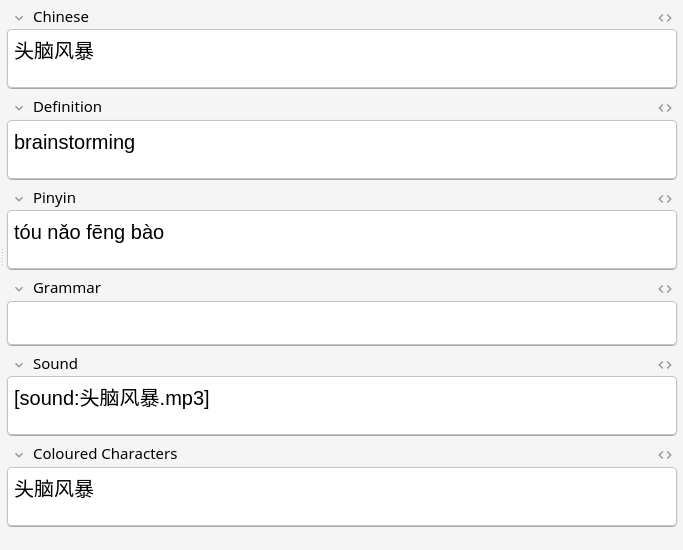
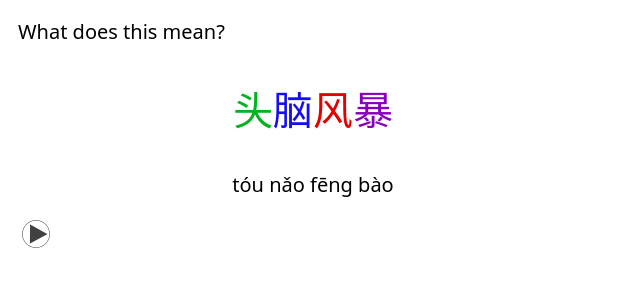
I wrote an org-capture template that calls a function I wrote for making a flashcard with a single key stroke. It automatically generates audio for the word, and fills in all the fields for the note type. It uses several of the zh-utils functions and is able to guess what word I want based on context.
(defun my/create-flashcard (word)
  (let* ((cc (cc-cedict word))
         (pinyin (pinyin-convert--string-to-tone-mark
                  (cc-cedict-entry-pinyin cc)))
         (definition (string-join (cc-cedict-entry-english cc) ", "))
         (sound (format "[sound:%s.mp3]" word))
         (level (zh-utils--get-hsk-level word))
         (grammar (zh-utils--get-word-grammar word))
         (coloured (zh-utils-tonify-word word)))
    (zh-utils-tts-make-audio
     "zh-CN-YunyangNeural"
     (format "%s %s" word word)
     word)
    (format
     (concat "* %s %s\n"
             ":PROPERTIES:\n"
             ":ANKI_DECK: Chinese::New\n"
             ":ANKI_NOTE_TYPE: Jack Chinese\n"
             ":END:\n"
             "** Chinese\n%s\n"
             "** Pinyin\n%s\n"
             "** Definition\n%s\n"
             "** Grammar\n%s\n"
             "** Sound\n%s\n"
             "** Coloured Characters\n%s\n")
     word
     (if level (format ":%s:" level) "")
     word pinyin definition grammar sound coloured)))


(defun my/create-flashcard-from-context ()
  "Create flashcard using context-aware word selection."
  (let ((word (zh-utils--org-capture-flashcard-get-word)))
    (when word
      (my/create-flashcard word))))

(push '("c" "Chinese Flashcard" entry
      (file "~/notes/new-flashcards.org")
      (function my/create-flashcard-from-context))
    org-capture-templates)
To make the coloured characters in Anki match the colours of Modus Themes, I add the following CSS to the card’s styling.
.t1 {color: #e30000;}
.t2 {color: #01b31c;}
.t3 {color: #150ff0;}
.t4 {color: #8800bf;}
.t5 {color: #777777;}

.nightMode .t1 {color: #ff8080;}
.nightMode .t2 {color: #80ff80;}
.nightMode .t3 {color: #8080ff;}
.nightMode .t4 {color: #df80ff;}
.nightMode .t5 {color: #c6c6c6;}
Fonts
The two Chinese fonts I like to use in Emacs are Adobe Fangsong and Sarasa Gothic. I often toggle between the two of these, but I didn’t think that this was worth including in my zh-utils package. You may find it useful as a starting point.
(defun my/set-han-font-fangsong ()
  (set-fontset-font "fontset-default" 'han
                    (font-spec :family "Adobe Fangsong Std"))
  (setq my/han-font "fangsong"))

(defun my/set-han-font-sarasa ()
  (set-fontset-font "fontset-default" 'han
                    (font-spec :family "Sarasa Mono SC"))
  (setq my/han-font "sarasa"))

(defun my/toggle-han-font ()
  (interactive)
  (if (equal my/han-font "sarasa")
      (my/set-han-font-fangsong)
    (my/set-han-font-sarasa)))

(set-fontset-font "fontset-default" 'han
                  (font-spec :family "Sarasa Mono SC"))
(setq my/han-font "sarasa")
Further reading
There are not too many Emacs resources specifically aimed at Chinese learners. One is Have Emacs teach you Chinese by Josh Moller Mara, which uses org-capture and org-drill for making flashcards.
However there are big communities of Chinese speaking Emacs users online. The biggest one is undoubtedly the emacs-china forum. There is also the emacs-chinese repository for common issues with Chinese and Emacs, and also the EmacsTalk podcast.
I am excited for this talk at EmacsConf 2025 which will show a custom major-mode for switching languages and the speaker will also focus on exporting notes, which is something I haven’t considered up to this point.
I plan to keep this article updated with further developments, so please don’t hesitate to contact me with any information that should be included.
✉️ Respond by Email.